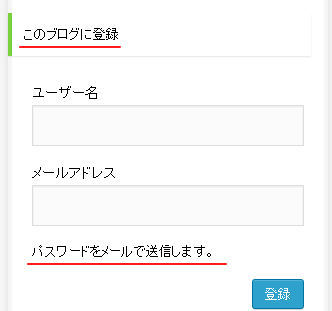
wordpressのログイン画面の文言の変更方法!
翻訳ファイルを修正せずに変更する方法になります。
wordpress ログイン画面の文言を変更する方法
function.phpに下記のコードを記載します。
function custom_gettext( $translated, $text, $domain ) {
    $custom_translates = array(
        'default' => array(
            'このブログに登録' => '変更するテキスト',
        )
    );
    if ( isset( $custom_translates[$domain] ) ) {
        $translated = str_replace( array_keys( $custom_translates[$domain] ), $custom_translates[$domain], $translated );
    }
    return $translated;
}
add_filter( 'gettext', 'custom_gettext', 10, 3 );
「’このブログに登録’」の部分を変更するとログイン画面だけではなく他のテキストを変更できます。
ブログじゃないサイトでは必須の変更箇所なので重宝するかもしれないですね。



「wordpressのログイン画面の文言を変更する方法」への1件の返信
とても参考になりました!